Showing posts with label calculator. Show all posts

Saturday, December 31, 2016

Half and Half: Managing Technology Use During Math Assessments


I'm just saying....this is new for me.  I have tried it once and would love some feedback on this idea.  

Splitting up the time a student is able to use technology on an assessment is not new.  You have seen it before where you give the first part of the assessment as "No-Technology" or "No Calculator" and the second part of the assessment as "Technology Allowed".   So this idea of giving the whole assessment at once and then splitting up the time half and half for "No Technology" and "Technology Allowed" is new for me.  It accomplished a few goals that I had for it.  Let me tell you how I worked it and then you can give me some feedback on what you think.

1.  Give the whole assessment to the students at the beginning of the class.  (You are not giving a part of the test to be no-technology and part of the test to be technology allowed)  
2.  Do not allow technology for the first half of the assessment.  
3.  Then allow the students to take out their technology to finish their assessment.  

Here are the positives.
1.  Students are usually looking at a problem twice.  
2.  Students are making predictions about the problems without technology and then confirming their predictions with technology.
3.  It affirms the use of mental math.
4.  It forced students to make a plan instead of just guessing with technology.

Negatives
1.  It takes away a really useful mathematical tool for part of the assessment.
2.  Students are a fearful to be without their technology
3.  The traditional problem solving approach is thwarted by not having all the math tools available.

Please give your thoughts and ideas in the comment section.

Wednesday, January 27, 2016

Getting Rid of "No Calculator" Questions on Math Assessments

I have typically given assessments with both calculator questions and no-calculator questions.  I've reasoned that students ought to know how to do a few things without the use of a calculator.  (maybe we should say technology now instead of a calculator)  Now I've reevaluated my opinion.  I've changed over to the idea that all my questions on any assessment should be allowing the use of technology.  Why?  That is a question I hope to answer for you. 
1.  Change the question if you think they can solve it with technology too easily.  You will find it probably wasn't a good question in the first place.  I like to change my "too easy with technology" questions to be reversed. Example:  Change....Solve x^2-4x-12=0  to be this...Create a quadratic equation to have solutions of x = 6 and x = -2.

2.  Technology is a great way to reinforce answers.  My tests often have this as the directions.  Solve using algebra, and verify your answer using technology.  Justify your work.  Or even simpler, solve in two ways.
3.  No Calculator questions strip the students of their best and most visual resource:  THE GRAPH. What No Calculator questions do is get students to forget that GRAPHING is a GREAT way to solve almost anything.  Don't we want to encourage graphing?  I don't mean graphing by hand either.  I mean a really fast way to analyze a problem.   Are we discouraging graphing because that is too easy?    When we take that away from students that is a major loss for their problem solving skills.

4.   My assessments are changing.  I no longer have 30 questions on a test.  I given less computational questions and more conceptual questions.  I have fewer questions which will help my students focus in on the difficult ideas.  They often have to show answers in multiple ways.  I'm always asking them to explain WHY did you do something.  The questions are a little more challenging and need to be able to use technology to solve.

5.  Technology is NOT CHEATING!  Solve this problem.  3x + 5 = 23   How about graphing?  We have two lines and they are intersecting.  This is a system.  Maybe y= 3x + 5       and      y = 23.  Then find the intersection point.  Is that cheating?   I think the way to give this question is to ask students to solve this problem by graphing and algebra.

6.  A student without technology is often asked to find an answer a certain way.  It might even have only one way to solve it.  I think this takes the creativity away from a student.  It also causes them to be fearful of not making a mistake because they can't even check it with other methods.
7.  What about the argument that we need to have our students get better at computational math skills?  I AGREE.  However, I don't think that a student with good computational math skills equals a complex math thinker.  

8.  I'm going to give more messy number problems.  Technology allows us to give our students weird numbers.  We should be doing that on most of our questions.  Messy numbers actually will encourage them to understand what is happening.  (By the way, have you ever been asked by a student if the answer was wrong because it had a decimal in it?)

9.  Having students use or not use technology is not going to change their number sense during an assessment.  I think we have to promote number sense in many ways during our classes.  But I don't think we should force them into manual calculation during an assessment.  I also don't think that a bunch of calculations by hand will change their number sense too much.  It will probably just build the hate they already have for math.

How about you?  What do you think about having "no calculator" questions on your assessment?  I'd love to hear from you.


Thursday, June 5, 2014

10 Reasons Why I think the TI-84 is on the way OUT!


Yesterday a colleague told me she overheard some students talking about how they never used their TI-84 at home.  She pursued the discussion and they said that they use DESMOS the online calculator all the time at home.   I think the use of it will go away slowly.  But it will happen.

The TI-84 (or TI-83) has been a fixture in my classes for many many years.  It has been a requirement on my syllabus.  It is something that I would daily ask my students to take out and work with.  I can't count the number of tutorials I've made to help use the TI-84.  It has been a go-to device for CONCEPTUAL learning.  But things are changing.

My Prediction.  Our school will not be requiring the TI-84 in the school year 2015-2016.  I have no authority to make that call.  I'm just making a prediction.  Our school goes 1 to 1 that year.  In my opinion, the days of every student having a TI-84 are going away.  Why?  Because other things are passing it up. And the thing that is passing it up is NOT another Graphing Calculator.  It is the Internet with web based interactions and  apps.

-

10 Reasons why I think the  TI-84 will NOT be required at our school in 15-16 
1.  Touch Screen
Students are getting frustrated with the TI-84 because it doesn't offer a touch screen.  The touch screen on a SMART-Phone or a tablet helps with finding the right window, editing data, sliders, and a bunch of other cool things. Also, the mouse is even better than the awkward navigation system of the TI-84.   I have tried to physically touch the TI-84 screen many times.  That's embarrassing.

2.   Ease of Use
As technology gets easier and easier to use.  The TI-84 seems to be more and more confusing to use.

3.  Size of Screen
A computer screen is a lot bigger than a TI-84 screen.  And a SMART-Phone screen is equivalent to a TI-84 screen.

4.  THE COST!
Why should we ask our students to pay $100 if our students will have constant access to a district owned device?  (i.e. tablet, Surface or Chrome book)  EVERYTHING that a TI-84 can do, a district owned device can do.

5.  1 to 1
Our district will likely go 1 to 1 in the 2015-16 school year. Every student will have a district owned device like a tablet at that time.  It doesn't make sense to have both devices.

6.  Data Exchange
The TI-84 system of exchanging data is old and outdated.  Basically it is useless.  For me to get something onto my student's calculator is nightmarish.  (It used to be really cool)  But, because the transfer of data is so easy with phones, and computers, and  tablets, that the technology of the TI-84 is really getting in the way of collaboration.  Remember, it used to be so cool to give your students a program or some data via the cord that goes between the calculators.  There is way too much teaching time wasted on account of this.  The students know a lot of ways to get information to each other that does not require a cord.

7.  Finding the Right Window
I have forever said that finding the right window is a great math skill on the TI-84.  However, I think I have been bypassed with the love of this skill.  The ease of a computer or tablet to get the right screen is far superior to the TI-84.

8.  Animations/Sliders
Sliders offer a hands on approach to math.  It encourages participation with the activity, with low risk high reward outcomes.

9.  Apps and Programs
The Internet math based apps are gaining momentum.  It's getting easier and easier to use math notation on the Internet.

10. Internet Based Math 
Desmos, Geogebra, LaTeX, online calculators etc.  This is just the beginning.  

Standardized Tests are the problem. I don't know what will happen with these.  The TI-84 has been a fixture for an acceptable device on the standardized tests for a long time.  With the PARCC online testing, this might be changing too.

TI-84 may you Rest In Peace.  It is time to move on.

Tuesday, February 25, 2014

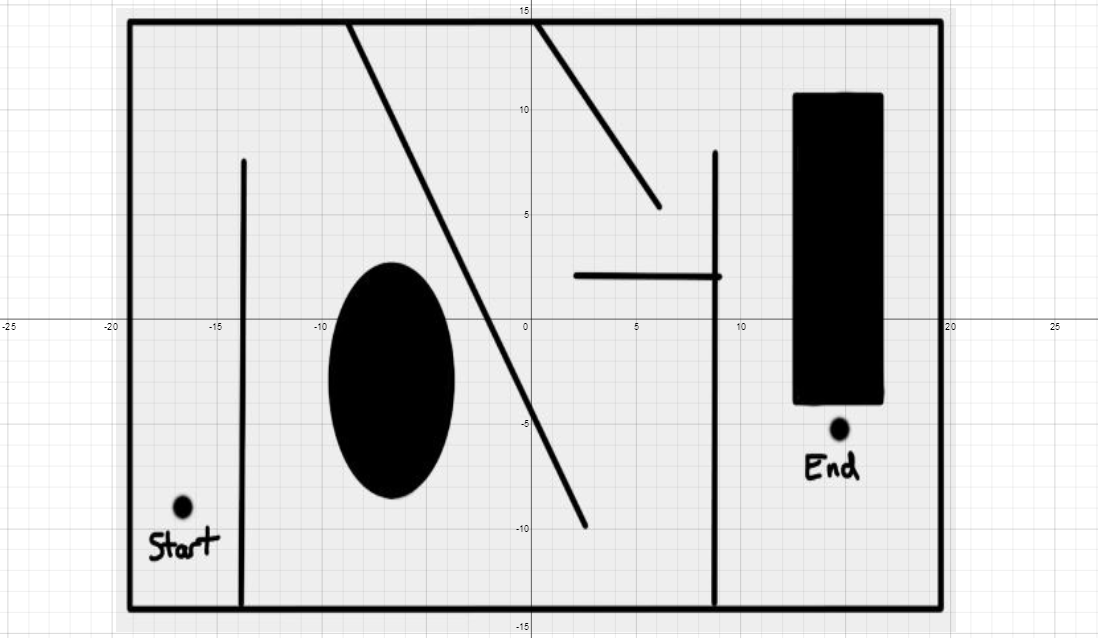
The Desmos Obstacle Challenge

Here is the challenge:  To move from the START POINT to the END POINT using equations.  You will have to navigate a little bit through some obstacles.  You can have your students use any equation or certain equations.  For instance, you could have them use all parabolas or all lines.  I have put together a few challenges.  They are below.  You can go to any of them simply by clicking on the image.  If you want to make your own, then just go to www.desmos.com and click on the "+" sign (add item) and add a picture of your own.

Click on any graph to go to the DESMOS graph and take the Challenge.  


Desmos has a FACE drawing website that all math teachers need to check out calling it DESMAN.


Friday, February 21, 2014

Making a Face with DESMOS.com

If you haven't worked with desmos yet, you are missing out.  It is so easy and intuitive.  The students will catch on so easily.  Here is the in class assignment I gave today.  This was a precalculus class.  You can easily adjust this for any high school math class.

This was a student's work was done in 15 minutes of class time.  There is so much math here too.  
  

Sign up with desmos.com and make a face using the free online calculator.

Your face must include these things:
1.  A circle or ellipse
2.  A line
3.  A sin or cos wave
4.  A slider
5.  A parabola
Now post your face in a link to this website:  http://tinyurl.com/nchsprecalculus6

Please go to this site to see all the wonderful examples that my students made.  They will make you smile.

Here are some questions that I had today.
How do you make the sin wave go vertical instead of sideways?
How do you move the circle from the center?
How do you restrict the x values so they don't always show?
How do you make a circle bigger?
How do I make this parabola wider?

Take 15 minutes and make a face today and you will see how much math DESMOS has.  Now this was a fun class.  The students were really active in their pursuit of the math topics. Please try this and let me know how it goes.
Dave


Wednesday, April 24, 2013

Desmos Online Calculator with SLIDERS


I love the Desmos Online Calculator. 
 It is easy to use.
Easy to Share.
You can Embed it. 
You can make sliders with it.
Give it a try.
I

Desmo Website
Library of Sliders

Here is a cool site full of examples from a class using Desmos
http://padlet.com/wall/rvkica26qi
Here is one of those examples.  Click on it to make it interactive.

Wednesday, November 2, 2011

Awesome Color Graphing Calculator ONLINE

Now I really like this one.  I like it because it is very easy to use.  It can graph my lines in color.  It can graph an inequality.  It is absolutely free.  Just go to the site below and use away.  It doesn't have all the bells and whistles that a TI-84 would have.  I think I like it for displaying multiple graphs at once.  This makes it so much easier to see the different graphs.  You can say "Where the green function and the red fucntion intersect".  Let me know what you think.
Best,
Dave
http://my.hrw.com/math06_07/nsmedia/tools/Graph_Calculator/graphCalc.swf