
Showing posts with label geogebra. Show all posts

Sunday, October 5, 2014

Shifting to the use of Desmos and Geogebra Online Graphing Calculators


Wow.  This is fun.  I can't believe how easy it is to put math into our student's hands.  It is fast too. With a simple url link I have given my students many activities in seconds that takes them DIRECTLY to the concept.  This year I have really shifted my thinking away from the hand-held graphing calculator to the online calculators Desmos and Geogebra.  I use both for different purposes.  This post is a little about my journey this year.

For my day to day work, I have my students take out their smart-phones, or their iPads, or their school administered tablets and use Desmos free online graphing calculator.  For class activities, I often use Geogebratube.  This is easy way to challenge students with a math "scenario" online.


DESMOS EXAMPLE
This week we were reviewing quadratics and I gave this "challenge" to my classes.  They had to navigate a MAZE with lines and parabolas.  Here is the actual activity that I gave them. http://tinyurl.com/sladkey218    Notice it is an easy to use to type in link.  (This is called a url alias and I use the free website called http://tinyurl.com to set this up)   I  also made a short video for help clues too.  Not everyone needed it.  http://tinyurl.com/sladkey219 
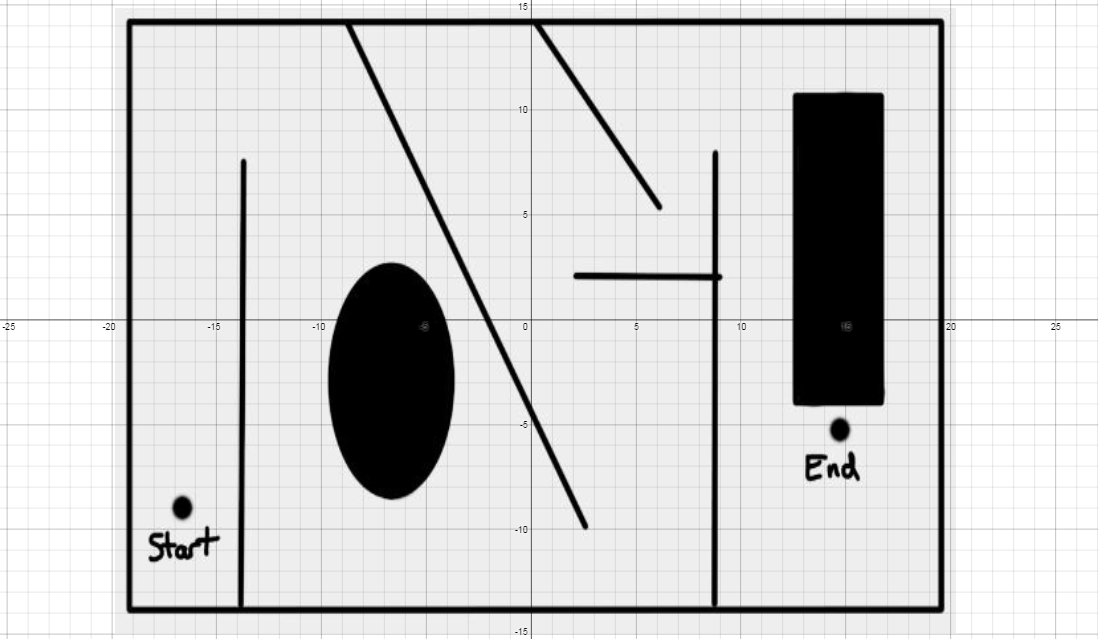
Here are a couple of comments my students have made about Desmos.  One was how he liked Desmos because the he could see both the graph and the equation at the same time.  He didn't have to go back and forth from the equation to the image.  Another student said they like the fact that they could find the graph so easily.  You can just use your fingers to pinch the screen and you can locate the graph.  Whereas while using a handheld graphing calculator you have to go back and forth from window to graph, to finally get the right graph screen.
This is how one student solved it.  There is so much math here.  The students really talk the talk too.


One video that really inspired my use of Desmos was by @bobloch on twitter he shared this demonstration on inequalities.  Check this out.  

GEOGEBRA EXAMPLE
I have always had a hard time explaining increasing and decreasing.  This turtle Geogebra activity really helped my students visualize what increasing and decreasing is and how it is represented.  http://geogebratube.com/student/m149285

You can see that there is a ton of material that can be used with Desmos and Geogebra.  Go and explore.  Let me know how it goes.  My twitter name is @dsladkey.  I'd love to hear from you.

Best,
Dave

Thursday, June 5, 2014

10 Reasons Why I think the TI-84 is on the way OUT!


Yesterday a colleague told me she overheard some students talking about how they never used their TI-84 at home.  She pursued the discussion and they said that they use DESMOS the online calculator all the time at home.   I think the use of it will go away slowly.  But it will happen.

The TI-84 (or TI-83) has been a fixture in my classes for many many years.  It has been a requirement on my syllabus.  It is something that I would daily ask my students to take out and work with.  I can't count the number of tutorials I've made to help use the TI-84.  It has been a go-to device for CONCEPTUAL learning.  But things are changing.

My Prediction.  Our school will not be requiring the TI-84 in the school year 2015-2016.  I have no authority to make that call.  I'm just making a prediction.  Our school goes 1 to 1 that year.  In my opinion, the days of every student having a TI-84 are going away.  Why?  Because other things are passing it up. And the thing that is passing it up is NOT another Graphing Calculator.  It is the Internet with web based interactions and  apps.

-

10 Reasons why I think the  TI-84 will NOT be required at our school in 15-16 
1.  Touch Screen
Students are getting frustrated with the TI-84 because it doesn't offer a touch screen.  The touch screen on a SMART-Phone or a tablet helps with finding the right window, editing data, sliders, and a bunch of other cool things. Also, the mouse is even better than the awkward navigation system of the TI-84.   I have tried to physically touch the TI-84 screen many times.  That's embarrassing.

2.   Ease of Use
As technology gets easier and easier to use.  The TI-84 seems to be more and more confusing to use.

3.  Size of Screen
A computer screen is a lot bigger than a TI-84 screen.  And a SMART-Phone screen is equivalent to a TI-84 screen.

4.  THE COST!
Why should we ask our students to pay $100 if our students will have constant access to a district owned device?  (i.e. tablet, Surface or Chrome book)  EVERYTHING that a TI-84 can do, a district owned device can do.

5.  1 to 1
Our district will likely go 1 to 1 in the 2015-16 school year. Every student will have a district owned device like a tablet at that time.  It doesn't make sense to have both devices.

6.  Data Exchange
The TI-84 system of exchanging data is old and outdated.  Basically it is useless.  For me to get something onto my student's calculator is nightmarish.  (It used to be really cool)  But, because the transfer of data is so easy with phones, and computers, and  tablets, that the technology of the TI-84 is really getting in the way of collaboration.  Remember, it used to be so cool to give your students a program or some data via the cord that goes between the calculators.  There is way too much teaching time wasted on account of this.  The students know a lot of ways to get information to each other that does not require a cord.

7.  Finding the Right Window
I have forever said that finding the right window is a great math skill on the TI-84.  However, I think I have been bypassed with the love of this skill.  The ease of a computer or tablet to get the right screen is far superior to the TI-84.

8.  Animations/Sliders
Sliders offer a hands on approach to math.  It encourages participation with the activity, with low risk high reward outcomes.

9.  Apps and Programs
The Internet math based apps are gaining momentum.  It's getting easier and easier to use math notation on the Internet.

10. Internet Based Math 
Desmos, Geogebra, LaTeX, online calculators etc.  This is just the beginning.  

Standardized Tests are the problem. I don't know what will happen with these.  The TI-84 has been a fixture for an acceptable device on the standardized tests for a long time.  With the PARCC online testing, this might be changing too.

TI-84 may you Rest In Peace.  It is time to move on.

Monday, January 20, 2014

Geogebra: The Unit Circle and the Reference Angle.

A couple of colleagues of mine have been showing me things in Geogebra.  I tried it this week with a unit circle problem.  It turned out great.  I had each student/pair with a computer in front of them.  We went over the Unit Circle and the students used the laptop or iPad to maneuver around the GeogebraTube post that I had made.  My colleague called this COMPANION Technology.  (They used it with their learning) Many of the students started out using the digital Unit Circle and manipulating it.  However, as time went on, many stopped using the digital technology and just did the work in their head or on paper. There was a homework assignment that involved the digital Unit Circle that I had made in Geogebra.  About half of the students ended up needing it.  The next day the unit circle questions and discussions were amazing.  They really had a conceptual grasp of it.
Here is the link to the http://geogebratube.com/student/m69795  to see the unit circle geogebra worksheet.  Please note the questions at the bottom of the page.

Steps I took to get this up and running.
1.  Download Geogebra to your desktop.  http://www.geogebra.org/cms/en/download/
2.  Make an interactive Geogebra File.  (see intro to geogebra youtube:  http://www.youtube.com/watch?v=OwNru3Znsfk  I used this video to help me:  http://www.youtube.com/watch?v=GG0F49XBJO0
3.  Save the file to a place where you can remember to retrieve it.
4.  Go to Geogebratube.org  http://geogebratube.org/  You will need to login.
5.  Upload your file to Geogebratube and fill in all needed information.
6.  Get the link of your upload and distribute it to your students.

I hope you can give Geogebra a try,
Dave