


Wow. This is fun. I can't believe how easy it is to put math into our student's hands. It is fast too. With a simple url link I have given my students many activities in seconds that takes them DIRECTLY to the concept. This year I have really shifted my thinking away from the hand-held graphing calculator to the online calculators Desmos and Geogebra. I use both for different purposes. This post is a little about my journey this year.
For my day to day work, I have my students take out their smart-phones, or their iPads, or their school administered tablets and use Desmos free online graphing calculator. For class activities, I often use Geogebratube. This is easy way to challenge students with a math "scenario" online.
DESMOS EXAMPLE
This week we were reviewing quadratics and I gave this "challenge" to my classes. They had to navigate a MAZE with lines and parabolas. Here is the actual activity that I gave them. http://tinyurl.com/sladkey218 Notice it is an easy to use to type in link. (This is called a url alias and I use the free website called http://tinyurl.com to set this up) I also made a short video for help clues too. Not everyone needed it. http://tinyurl.com/sladkey219
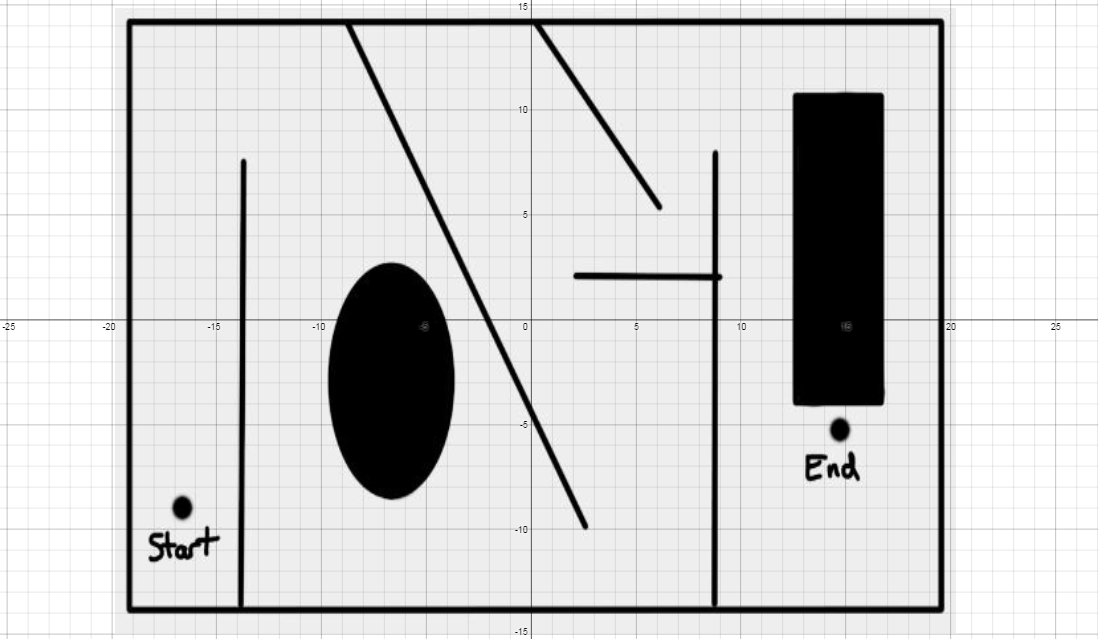
Here are a couple of comments my students have made about Desmos. One was how he liked Desmos because the he could see both the graph and the equation at the same time. He didn't have to go back and forth from the equation to the image. Another student said they like the fact that they could find the graph so easily. You can just use your fingers to pinch the screen and you can locate the graph. Whereas while using a handheld graphing calculator you have to go back and forth from window to graph, to finally get the right graph screen.
This is how one student solved it. There is so much math here. The students really talk the talk too.

One video that really inspired my use of Desmos was by @bobloch on twitter he shared this demonstration on inequalities. Check this out.

GEOGEBRA EXAMPLE
I have always had a hard time explaining increasing and decreasing. This turtle Geogebra activity really helped my students visualize what increasing and decreasing is and how it is represented. http://geogebratube.com/student/m149285

You can see that there is a ton of material that can be used with Desmos and Geogebra. Go and explore. Let me know how it goes. My twitter name is @dsladkey. I'd love to hear from you.
Best,
Dave


