Showing posts with label padlet. Show all posts

Monday, October 31, 2016

6 Reasons Why I'm Not Giving Worked Out Answer Keys to My Math Students Anymore


I have been giving out worked out answer keys to my math students for years.  These are handwritten PDF keys that I have made showing how I would do the problem.  Homework assignments and review assignments all had a worked out answer key online.  At the end of last year, I started having second thoughts about my answer keys.   And this year, I have completely abandoned them.  Why?  Mostly, I felt like I have been robbing my students of the typical thought process that should happen with any good math problem.  You know, problem solving stuff like creating patterns, accessing prior knowledge, discovery, conjecture, failure and so on.   So here is my list of 6 reasons why I have stopped making worked out answer keys.  Also, at the end of this post, I have a couple of things that I'm now doing to replace the worked out answer keys.


1.  Worked Out Answer Keys Eliminate "The Struggle"
What is "The Struggle"?  I think of it as the tension of which path to take while solving a problem.  This is a good thing.  It is a natural thing.  We all have "The Struggle" with math.  It is the "uncomfortable" part of math.  I love the fact that Brene Brown tells her students that they SHOULD BE UNCOMFORTABLE in her class.  Why?  Because learning is stretching, growing, and being vulnerable to say I don't know.   If we eliminate this "Struggle", we will be taking away the "Joy" of mastering the problem.  And yes, there is "Joy" in a high school math class.  However, with no struggle, there is no joy.  And the typical high school math class nowadays is just that... BORING.
2. Worked Out Answer Keys Reduce Collaboration
Students often use each other to collaborate.  When students have the worked out answer key in front of them, they don't need to work with anyone else to get at the solution.  As a matter of fact, students don't even want to talk to another student for fear that it will mess up their thinking with incorrect advice.  I think it is good for a student to listen to another students advice and be able to discern what is correct and what is not correct.  It is a life skill.  

3.  Worked Out Answer Keys Create the Fear of Being Wrong
Another problem is that when we create a key, we are telling the students that you must do it MY WAY.  Whether we intend that or not, we are sending a message.  Do the problem my way or you will be wrong.  Students get this right away and will not proceed until they know they are on the right track.  They become afraid to try.  Have you ever had a math student say they don't know what to do or where to start?  I think this is a classic "I'm afraid to try something and be wrong".


4.  Worked Out Answer Keys Stifle Creativity and Promote Memorization
I'm coming to the realization that creativity comes from the need to be creative.  If we never give our students the opportunity to be creative, they won't do it.  My own most creative moments have arisen because I had thought long and hard about some problem and couldn't get anywhere.  Then, I would usually be doing something else, or exercising and think...VIOLA, I need to do it this way.  The worked out answer key never gives our students the a chance to think long and hard on a question.  It gives them the answer. It really never gives them the chance to be creative.
One thing I have been trying to avoid is having my students just remember the steps of how to do a problem.  When students are memorizing the process, they are not really understanding the math.  Typically this type of math memorization does not last too long either.  Students might be able to repeat it for the test the next day, but is not in their math "tool box".  When students see answer keys, they try to remember the steps of a problem instead of actually thinking through how to do it.
5.  Worked Out Answer Keys Encourage Short Cuts
Can you imagine if someone EXPLAINED the solution to Towers of Hanoi to you before you actually tried it?  That is not the idea of a puzzle.  The idea of worked out answer keys is so that students will work out the problem on their own, and then check with the worked out answer key to see if they are correct.  This doesn't usually happen.  What end's up happening is the students will have the problem and the answer SIDE BY SIDE.  So when the student gets even the least bit anxious about not knowing what to do, they look at the worked out answer key.  Go ahead and try the puzzle below.  Towers of Hanoi  I almost can guarantee that after you tried Towers of Hanoi the first time you realized right away there is a better way.  You worked at it.  You figured it out. And you tried something different.  This is called LEARNING!  Giving worked out answers is like explaining the solution to Towers of Hanoi to someone BEFORE they try it.

6.  Worked Out Answer Keys Decrease Questions.
I have found that when students have the worked out answer key, they don't need to ask questions. Worked out answer keys make it easier for us, but not so good for students in the long run.  Questions are the essence of learning.  We want our students to ask questions.


Two Alternative Ideas to Worked Out Answer Keys
1.  ANSWER POOLS
Answer pools are the answers to the problems in RANDOM order.  First of all, the answer is not worked out.  Secondly, they know that if their answer is not in the pool, they have made a mistake.  Then the students will keep trying.  Click here for an example of an answer pool.  Many times I put too many answers in the answer pool.


2.  Public Posting of Student Answers
Students answers are different than the teachers answers.  That is because the student is not sure if another students answer is correct.  It gives our students the analysis skills.  They look at another students work and glean anything that they can from it.   Sometimes the student might consider different approaches to problems depending on the solution given.    Example of a Padlet with student answers posted.  I like Padlet to post answers.  However you can use any discussion thread to accomplish the same thing.


What are your thoughts?

Monday, September 28, 2015

World Record Distance for Throwing a Fish at a Stop Sign


What is the world record distance for throwing a fish at a stop sign?   Hey, I don't think this stuff up.  But one of my students did.  Try to imagine a competition where everyone was seeing how far they could throw a fish to actually hit a stop sign.  One of my students was searching the internet to see if there were any sites that would have some data on this.   Unfortunately he couldn't find any data on this.  He moved on to a new idea.

Letting my students choose their own rates of change brought a huge amount of buy in.  The used their Chromebooks to search for data.  It was a blast. The students came up with many different ideas. For instance one student picked McDonald's hamburgers.  Did you know that from 1990 to 2013 the price of a hamburger has gone up 14 cents every year?  They OWNED IT.  They also took the time to figure out exactly what the rate of change meant.  I have always had a hard time teaching this.  But because they tried to find the data themselves the could communicate the idea of rate of change and what what happening over time.

White Sox Tickets anyone?   The ticket prices went up $1.02 each year from 1991 to 2003.


One student chose this.  (1950 year,  0 people living in Antarctica)   (1990 year, 0 people living in Antarctica)   0 people over 40 years.   Rate of change is 0 people per year.  Very Clever.  However, I told him he needed to find some information that gave a rate of change OTHER THAN ZERO.


So what did this lesson do?
Differentiation?   Yep
Student Choice?  Yep
Engagement and buy in?  Yep
Crazy Ideas?  Yep
Messy Numbers?   Yep
Fun for the teacher?  Yep


 Here was the original assignment.  https://docs.google.com/document/d/1cygX8-EKqVdvGu-1IX-cthodUHeBVTGrrSA4cGsYS-4/edit?usp=sharing

Rate of Change Ideas for class


Here are the other postings.  We posted them to Padlet.


Monday, August 31, 2015

Easy Digital Collaboration: Padlet


I have been using Padlet.com for a couple of years now.  This year it is especially nice because we just went to a Chromebook for each student.  The benefits are many for me. Accountability. The students see others giving correct form for their work, they will want to give the correct form too. It raises the bar for quality work by being public.  This is great for getting 100% participation. Another big benefit is the fact that ALL students will have a voice. You will hear from EVERYONE. Lastly, I love the fact that students really would rather type than write on paper. This will amaze you. They will fill a whole section on a Padlet post, but probably would not like to write much at all on paper. You can use a Padlet tomorrow in class if you like. Just take these easy steps.


1.  Go to Padlet.com and create an account as soon as you can.  It is free.


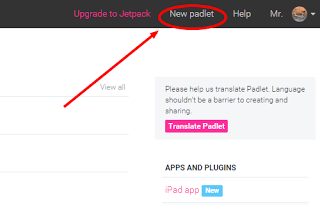
2.  Once you are logged in, then create a new Padlet.


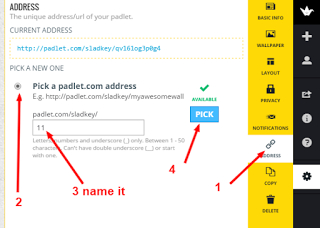
3.  Click on the Settings Icon and name the Padlet and put any special instructions.


4.  Now set the Layout.  I like Grid the Best.


5.  Now the last thing I do is change the address and copy it.  This makes it easier for your students to get to your Padlet.  It is not necessary to take this step.  However, if you are just giving the students the URL by having them go to it, then you will want to change the name to something easy.  Now your ready for the students.


In class
1.  Have them sign up for their own Padlet.com account before you have them do anything.  When they have done this, they leave a cookie trail for any post they make. (this creates accountability)  I very rarely have them post things without their name.


2. Now you can give them the URL address that you copied above.  Just pose a question and see the Padlet fill up with student responses.


Check out the example Padlets

EXAMPLE 1:  WHO CAN ENTER THE ROOM?

http://padlet.com/sladkey/teenagers

This Padlet is locked so you may not add to it.  There is one below if you would like to try to type into one.


EXAMPLE 2: HOW LONG DOES IT TAKE TO GET TO.......

Here is another one that asked to pick a city in the lower 48 states and guess the hours it would take to drive there.  Then to calculate how long it would take averaging 60 miles an hour.  Then to find the time Google said it would take to get there. Lastly answer the question of why the Google time is different than yours.

http://padlet.com/sladkey/literalequations


This Padlet is locked so you may not add to it.  There is one below if you would like to try to type into one.  


ADD TO THE PADLET BELOW.  Put your name, school, and location.  Please put an inspirational teaching quote for us all to benefit from.  It could be from a colleague or a former teacher or simply one you have always liked.  Please give credit to whoever gave the quote.  If you don't know, just put anonymous.  


Sunday, June 14, 2015

8 Things I'll Take Away from the GafeSummit 2015


GAFE SUMMIT June 11 and 12, 2015 in Homer Glen IL

Here is the link to all of the sessions

1.  FAILURE IS A PART OF LEARNING.  We need to incorporate this idea into all we do as teachers.  We need to create activities that students don't feel like they have to get it perfect the first time.  We need to be honest and show our own mistakes and failures.
INSPIRED TO TRY:  Give my math students a chance to fail (try and try again) every day by these types of warm ups.    Estimation  Questions  Would you Rather... Thanks  @jamestsanders  presentation
MY FAVORITE:  Scroll down and see a few sites that students love.  http://www.classroominthefuture.com/that-exists/
The Dung Beetle helps us remember that out of the bad comes the good.

2.  GOOGLE FORMS   This is a must in my classroom.  It is easy.  It is fast.  All the responses are nested into a spreadsheet.  Here a  couple of new things I have taken away.  You can put conditional formatting into your response spreadsheet.  For instance:  when you have a survey of how students are doing and you ask them to rank it 0 to 5.  Then you can conditional format any cells color to be lets say RED.  That would alert you to students who have a hard time with the material.  TUTORIAL 
INSPIRED TO TRY:  Exit slips and consistent communication through Google Forms.  Also, I want to look into Move Note.  Thanks @JasonMMarkey


3.  GOOGLE DOC and GOOGLE SLIDE   If you are trying to give a document to someone else so they can use it on their own, in the url at the top of the document just change the /edit to /copy.   Tutorial   I also learned how to make a pictorial table of contents in Google.  Here is an example. Slides Thanks @jheil65


4.  PADLET.COM  Padlet is my all time favorite student interactive site.  This session confirmed that Padlet is the BEST.  Padlet is simply a public posting board that the technology doesn't get in the way.  Go to http://padlet.com and sign up today.  I have my students all have accounts too.  Thanks @HollyClarkEdu

5.  QUESTIONS.  We don't allow students to ask enough questions.  I learned a structure that will help my students to ask questions without fear.  I'm really excited to use this.  In essence, as a group of four have our students ask a lot of questions and just write them down without judgement.  Then we ranked the questions for relevance and importance independently (however, it was digitally collaborated through google docs)  Then have them rank them as a group of four.   It was an excellent process.
INSPIRED TO TRY:  I would like to begin a unit with this structure.  This will help my students to ask questions before we know anything, thus give more freedom in asking any that are coming to mind.  Presentation   Thanks @HollyClarkEdu 


6.  GOOGLE +    I signed up for google plus professionally.  It has a lot of features that are really nice.  I have more to learn.  Thanks for helping me get started @cchausis


7.  GOOGLE HANGOUTS    I learned a lot of hangout etiquette .  Most importantly, I learned how to mute when some else is talking.  I learned that Hangouts are not longer tied to Google +.  You can screen capture something for all to see for the hangout.  You can give a link from your hangout for others to join you.  Use this link to go straight to a hangout.  http://g.co/hangouts  And tons more.  More Info here. Thanks @AmplifiedIT 


8.  CHROMEBOOK SHORTCUTS:  I love shortcuts.  This one was fun.  I'm just learning my way around my new Chromebook so this was perfect timing.  Here are a few of my favorite Short-Cuts.
Screen Capture

Turn the screen 90 degrees.  This one is most helpful for teachers for when students are playing tricks on their friends.  

This opens up all the Short-Cuts.  

I took all of these shortcut images from the presentation from Adad Ocampo which was great!


Friday, December 12, 2014

Give Meaning to Numbers with Technology

A colleague and I were talking about math problems a few days ago.  He told me that he really likes to give meaning to numbers because it helps the students put the numbers in context.  I completely agree. We were working on percents at the time in my Introduction to Algebra class so I decided to give a little more meaning to my percentages.  Here is what I did.


Since my students have laptops,  I had them go to Kohls.com and pick out an item that they liked. They got to choose a 15% off, 20% off, or 30% off coupon.  (I thought they all would pick the 30% coupon too, but they didn't)  Take the price of that item and reduce it by the coupon amount.  Then they were asked to add on 8% tax.  Lastly they had to post their work to a padlet.com site where all could see their work.  You can see their work too: http://padlet.com/dsladkey/kohls  Padlet is a great tool for student collaboration.  www.padlet.com   


Here is the progression of the assignment
1.  Find an item at Khols.com  Find the price.  (even if it is already discounted)
2.  Choose a 15% or 20% or 30% off coupon.
3.  Reduce the price by the amount on the coupon.
4.  Take the new price and add 8% tax to it.  
5.  Show your picture and all your work on a common padlet site for all to see.  http://padlet.com/dsladkey/kohls


What were the big takeaways?
1.  They learned the material without a bunch of problems without meaning.
2.  Choice.  It gave students a choice for what they wanted to work on.
3.  Pride.  When we shared these out, there was a lot of pride happening.
4.  Recall.  A student asked a question on the test and I just said "Do you remember what you did with the Kohl's activity" and they said, "Oh yeah"
5.  Engagement.  This activity took about one 50 minute period. They were diligently working the whole time.
6.  Accountability.  All students could see all the posts.

Dave
@dsladkey

Wednesday, May 28, 2014

Graphing Polar Equations with Desmos (online graphing calculator) and Padlet (online bulletin board)

This was easy.
We had just covered polar equations in precalculus. I then told each student they should make a cool design using 10 or less equations. Wow. They really loved it. They explored well beyond what we covered in class.

1. Log into desmos.com and either sign in or sign up.
2. Make a desmos polar graph using 10 or less equations.  Use r= equations and use theta as your variable. Also you can use a polar background if you like. www.desmos.com
3.  They should save their graph in desmos. (you can only do this if you are logged in)  Then click on share which gives you a link. Save that link.
3.  Then they had to log into the padlet.com site URL that I gave them. Here it is: http://padlet.com/dsladkey/6kdefazyz9wp  They double click anywhere on the screen to make a post. I had them put their name and then put the desmos link right in the post. www.padlet.com   I have put a picture of the padlet site.

Give it a try and let me know how it goes.
Dave