Saturday, February 28, 2015

Sometimes UN-Simplified is Better

To Simplify or Not to Simplify, that is a good question.


Recently, I have not been simplifying my work.  Let me explain.  We have been working on finding the equations of sine graphs in Precalculus.  I have found that when I type out my work in Desmos it doesn't automatically simplify it.  It still graphs it.  You can see the changes as you type them in.
This is really cool.  It leaves it so that the students can think about how the numbers came to be.  It is almost formula like.   See below.
 

Then, I asked my students to simplify the equation so that we can gain meaning out of the numbers.


Here is the project we just finished with if you are interested in taking a look. It is a project where we look at the vertical height of a person on a swing.  There is data involved and then we have to find the correct sine wave.   http://tinyurl.com/swingdesmos


Here is another place that I see non-simplification as a perfect fit.  In linear equations using slope. You can see here it fits right into the slope formula.  This also shows equivalencies of linear equations.   So if you make a mistake on one simplification step, you will see it right away because it will not match up with the first one.

Actually, I think that when we show our steps in this way we are "digitally showing our work."  Hope you can give it a try.

Best,
Dave


Thursday, January 29, 2015

Math is always better when you do more than just WATCH

It is easy to think that when students watch us do problems that they get it.  They are usually concentrating and thinking about what we are saying, but it often does not sink in.  I am trying to get my students to DO MORE themselves.  This time it has to do with making a Ferris Wheel and using it to help solve Trigonometry problems.   Yes, it does take time out of class to do this.  I think it is well worth it to invest the time now, so that they can recall it later.


This unit we are covering the beginnings of Trigonometry.  Working with the Trig fundamentals is tricky.  Students often get confused.  So a few years ago we introduced the unit called "High Dive" where a fictitious scenario of a person being released from a Ferris Wheel into a moving tub of water.  (Key Curriculum Press)  Most importantly it gives the students a visual handle on the basic Trig ideas.  This year I extended this to include a physical handle on Trig.  We made Ferris Wheels out of pipe cleaners.  It turned out really well.  Seeing the test scores from this year, I'm confident that the students did even better than last year.  Here is what we did.


There is a Ferris Wheel whose center is 65 feet off the ground.  The Ferris Wheel has a radius of 50 feet.  The Ferris Wheel is moving at a rate of 1 revolution per 40 seconds. The diver is on the Ferris Wheel which always moves in a clockwise direction and will start from the 3 o'clock position. Here are some questions we explored.
1.  When will the Diver be at the highest position?  What is that height?
2.  What is the angular speed of the diver?  What is the linear speed of the diver?
3.  Map the divers height for 1 revolution of the Ferris Wheel.
4.  What height will the Diver be after 14 seconds?
5.  If there was a 30 fence hiding the front of the Ferris Wheel, what percent of the time is the Diver ABOVE the fence?
6.  How long does it take to go from the 3 o'clock position to the 8 o'clock position?


So with our Ferris Wheels IN OUR HANDS, we went through many of these questions while moving the wheel to match our questions.  The students made the Ferris Wheel with their own hands.  It was a homework assignment.  I gave them 8 pipe cleaners and 2 Popsicle sticks and they had to make a working Ferris Wheel.  They also had to make a place where the diver was on the Ferris Wheel.  Kind of like a marker.

Here is one of my students talking about her experience with the Ferris Wheel.


One Student made an unbelievable Ferris Wheel.  He got his own piper cleaners.

I know I learn better when I can touch it, feel it, manipulate it and visualize it.  

Best,
Dave

Friday, December 12, 2014

Give Meaning to Numbers with Technology

A colleague and I were talking about math problems a few days ago.  He told me that he really likes to give meaning to numbers because it helps the students put the numbers in context.  I completely agree. We were working on percents at the time in my Introduction to Algebra class so I decided to give a little more meaning to my percentages.  Here is what I did.


Since my students have laptops,  I had them go to Kohls.com and pick out an item that they liked. They got to choose a 15% off, 20% off, or 30% off coupon.  (I thought they all would pick the 30% coupon too, but they didn't)  Take the price of that item and reduce it by the coupon amount.  Then they were asked to add on 8% tax.  Lastly they had to post their work to a padlet.com site where all could see their work.  You can see their work too: http://padlet.com/dsladkey/kohls  Padlet is a great tool for student collaboration.  www.padlet.com   


Here is the progression of the assignment
1.  Find an item at Khols.com  Find the price.  (even if it is already discounted)
2.  Choose a 15% or 20% or 30% off coupon.
3.  Reduce the price by the amount on the coupon.
4.  Take the new price and add 8% tax to it.  
5.  Show your picture and all your work on a common padlet site for all to see.  http://padlet.com/dsladkey/kohls


What were the big takeaways?
1.  They learned the material without a bunch of problems without meaning.
2.  Choice.  It gave students a choice for what they wanted to work on.
3.  Pride.  When we shared these out, there was a lot of pride happening.
4.  Recall.  A student asked a question on the test and I just said "Do you remember what you did with the Kohl's activity" and they said, "Oh yeah"
5.  Engagement.  This activity took about one 50 minute period. They were diligently working the whole time.
6.  Accountability.  All students could see all the posts.

Dave
@dsladkey

Friday, November 7, 2014

Shadowing a Student for a Day

I was a student in high school again today.  Wow, what an experience.  Shadowing a student  has helped me to know better how to teach my current students.  I can know a little bit better what is going on in their world.  Here was the schedule for the day:  Algebra 2, Chemistry, Digital Art, US History, PE ( swing dancing), Lunch, Study Hall, and English.  


Here are some things that I got out of the day.

1.  I'm exhausted.
This was mentally and physically taxing today.  I was wiped out by 7th period.  I had one more period to go.  Our students really put in a lot of energy into the school day.  And most have some type of extra curricular activity after school.
How I might modify my teaching:  Empathize and adjust the outside of class workload.

2.  I sat in a chair a lot today.  I being a math teacher calculated how much time in minutes I was in my chair.  303 minutes in my chair.  Almost all of the chairs were swivel chairs which helped.  However, that is a lot of time just sitting.
How I might modify my teaching:  Create more activities that encourage movement.  Give more choices for students to be able to move around during class.

3.  Our students are learning a lot in one day.  I took notes in every class.  My notes turned out to be 7 pages long.  It was a ton of information.  It was engaging material.  I really loved learning these new things. I also wanted to create something instead of just learning about something.  
How I might modify my teaching:  Be efficient.  Be concise.  Don't  give busy work.  Have a purpose with everything I give my students. Have students CREATE more.

4. We have excellent students and staff at our school.  I really wish I could be back in school.  The teachers were engaging and passionate about what they do.  The students were respectful and were very cooperative.
How I might modify my teaching:  Tell my students how much I appreciate them.  Enjoy the moment and the journey.  I have a wonderful job.  Show how much I enjoy teaching.

5.  I got to know the teacher very well in one class period.  What it made me ponder was "do my students know if I know them?"
How I might modify my teaching:  I need to know my students.  I need to show them individual time.  Students deserve individual attention.


Kyle, You were the perfect host.  I can't thank you enough for letting me into your world.  It was eye opening.  I appreciate what you go through a lot better now that I was in your shoes for a day.  Thank you!


Random Thoughts

  • We did a Brain Break in the middle of one of the lessons.  That was FUN!
  • I'm pretty sure I was the only one in the cafeteria who had a hard boiled egg in their lunch.
  • Jessica helped me out in PE swing dancing.  Thank you for being very patient with my 2 left feet.  I really was nervous
    about this part of the day. 
  • MY EYES ARE BAD.  I realized right away that I couldn't see the board as clearly as I thought I could.  (must have something to do with being 50! haha)
  • THANK YOU for inventing Swivel Chairs.  
  • The lunch table talk was blunt but enlightening.  
  • I almost made Kyle late because I had to use the bathroom between classes.  It made me a lot more sensitive to allowing students to go to the bathroom during class. 
  • My mind wondered a lot.  There is a lot of dead time in the day to be able to do this.  I tried to stay focused but was a little tired.  
  • I really liked math class.  I guess it is a good thing I'm a math teacher.  
  • I never had an interest in the Great Gatsby until the class today.  Now I'm very intrigued. 
  • Hacky sack is a tough game.  To get someone else out you need to juggle at least 4 times.  I only did 2.  I was out pretty quick.  
  • I'm really humbled to be a teacher.  It is quite a responsibility.  I don't want to ever take for granted the charge I have.  
  • I took 7 pages of notes today.  An organization system is a must for students.  


Here is my journey on Twitter Storyify Journey 


Now, I challenge you to Shadow a Student for a Day!  Ask your principal today and DO IT.  You will be pushed out of your comfort zone, but you will never regret it.  Let me know how your journey goes.
My Very Best,
Dave



Friday, October 24, 2014

Hashtag Closure

This was really fun.  My students loved it.  And it was different.  It brought out relevance and personality to the class.  It also gave a voice to some of my students.  Give it a try.  Thanks to my colleague Mary Martin (Via Steve Stack)  who gave me this idea.  

Ask your students to make a hashtag summary for the topic of the day (or week, or unit, or ?)  I used it as I closed the day out. Then ask them to share them out with the rest of the class.  You can share out results on the board.  Then have students vote on them.  Students loved it.  For those of you who do not know what a hashtag is…A hashtag is a word or an unspaced phrase prefixed with the hash character, # , to form a label.  Hashtags are used in social media as a type of tag to group information.  #postseason #edchat

I did this with my precalculus student's and they put a few things that were terrific and some things that were just plain funny.  We were studying rational functions and vertical asymptotes.
#ZeroDenom  #FindTheZerosInTheDenominator Some funny ones were #AskMrSladkey #Desmos.  I was talking about something the next day in class and said "remember the hashtag closure" from yesterday.  It was a great brain trigger.


Mary taught me to use Socrative.com to share out results.  It is so easy.  I had never used it before last week.
  •          Log into socrative.com  and then teacher sign in. Go to Sign up.  Then go to profiles and change your room name to your last name.
  •         Go to quick question.  Then click Short Answer question.  Type in your question.  Require students names.  Click Start
  •         Have your students go to socrative.com and go to the student sign in.  ( I had my students use their phones)  Have them use your room name.  They don’t need to sign up.
  •         When they answer the question it will show up on your screen for all to see.  After all have entered their answer, then vote on the result.

I hope you can give it a try today.

Dave

Sunday, October 5, 2014

Shifting to the use of Desmos and Geogebra Online Graphing Calculators


Wow.  This is fun.  I can't believe how easy it is to put math into our student's hands.  It is fast too. With a simple url link I have given my students many activities in seconds that takes them DIRECTLY to the concept.  This year I have really shifted my thinking away from the hand-held graphing calculator to the online calculators Desmos and Geogebra.  I use both for different purposes.  This post is a little about my journey this year.

For my day to day work, I have my students take out their smart-phones, or their iPads, or their school administered tablets and use Desmos free online graphing calculator.  For class activities, I often use Geogebratube.  This is easy way to challenge students with a math "scenario" online.


DESMOS EXAMPLE
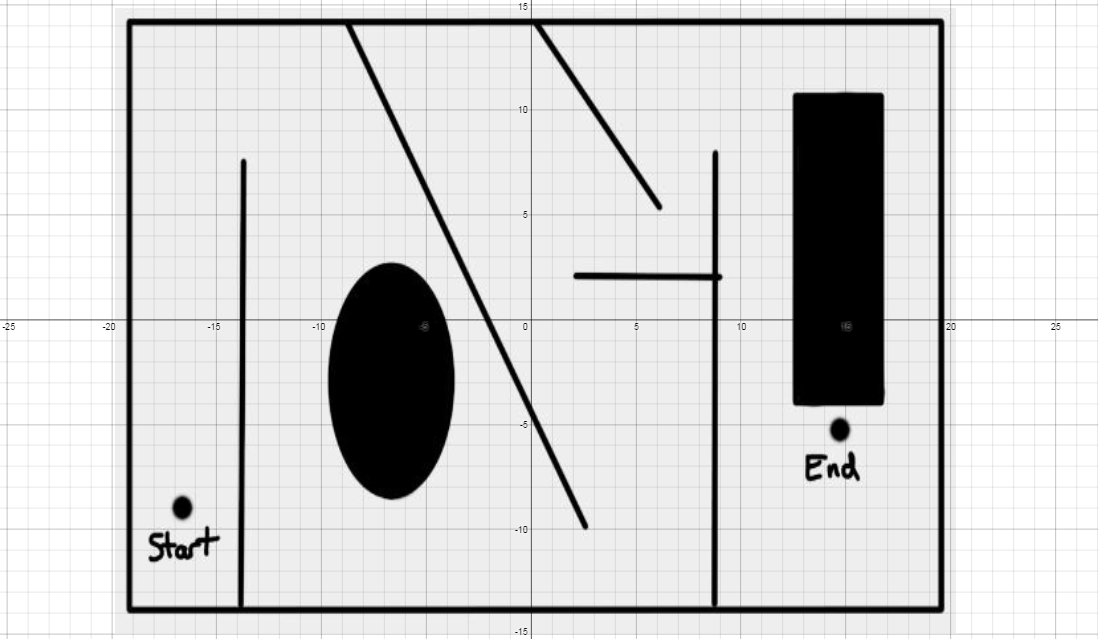
This week we were reviewing quadratics and I gave this "challenge" to my classes.  They had to navigate a MAZE with lines and parabolas.  Here is the actual activity that I gave them. http://tinyurl.com/sladkey218    Notice it is an easy to use to type in link.  (This is called a url alias and I use the free website called http://tinyurl.com to set this up)   I  also made a short video for help clues too.  Not everyone needed it.  http://tinyurl.com/sladkey219 
Here are a couple of comments my students have made about Desmos.  One was how he liked Desmos because the he could see both the graph and the equation at the same time.  He didn't have to go back and forth from the equation to the image.  Another student said they like the fact that they could find the graph so easily.  You can just use your fingers to pinch the screen and you can locate the graph.  Whereas while using a handheld graphing calculator you have to go back and forth from window to graph, to finally get the right graph screen.
This is how one student solved it.  There is so much math here.  The students really talk the talk too.


One video that really inspired my use of Desmos was by @bobloch on twitter he shared this demonstration on inequalities.  Check this out.  

GEOGEBRA EXAMPLE
I have always had a hard time explaining increasing and decreasing.  This turtle Geogebra activity really helped my students visualize what increasing and decreasing is and how it is represented.  http://geogebratube.com/student/m149285

You can see that there is a ton of material that can be used with Desmos and Geogebra.  Go and explore.  Let me know how it goes.  My twitter name is @dsladkey.  I'd love to hear from you.

Best,
Dave

Wednesday, June 11, 2014

5 Random Technology PD (Professional Development) Thoughts


Technology is tricky. Everyone is at a different place. So PD (Professional Development) time is very important. Here are a few random thoughts that have been rolling around my head since our latest Technology PD day.


1.  Whole group "how to" technology training rarely works. Most of the time 1/3 of the people are bored, 1/3 are with you and 1/3 are completely lost and frustrated. Group "how to" technology training certainly has it's place at times but should be avoided if possible.  

2.  Let the computer teach the "how to" technology through tutorials and a self guiding pace.  Offer 1 to 1 help for the very few who can't do self guided. 

3.  Design PD activities that model good teaching practice (above the SAMR bar or higher in Blooms taxonomy) and forces the use of the technology within the activity. This way you can show a good teaching idea and you can help them learn a new technology. 

4.  More than a half day of whole group technology PD is too much.   If you want a whole day of PD then maybe half the day is spent in a whole group atmosphere and half is spent in very small groups  or with a partner or alone.   

5.  I think some self reflection time must be built in to our PD.  i.e.  15 minutes of journal time reflecting on the things you have learned and the questions you still have out there.   We put a lot of emphasis on closure in the classroom, and rightly so. Self reflection is a type of individual closure that will help us process what we've just learned and help us remember it. 

I welcome your random thoughts or comments.